


Cloe Completed Listing on eBay
3.839.00 Reviews
App Specs
- Version
- 97
- Updated On
- License
- Free
- Downloads
- 10,000+
- Developer
- Epic Appz
- Categories
- Shopping
- Platform
- Android
Screenshots
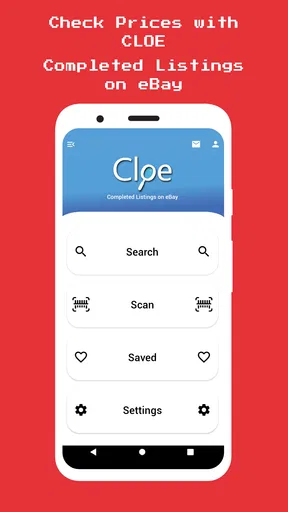
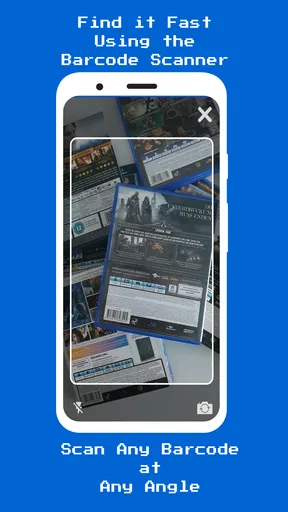
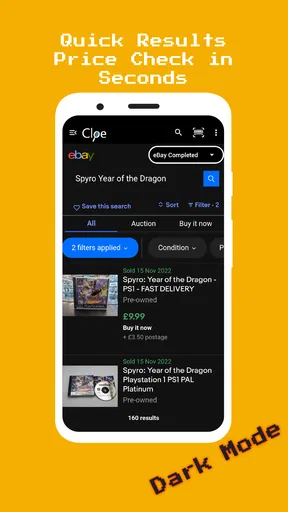
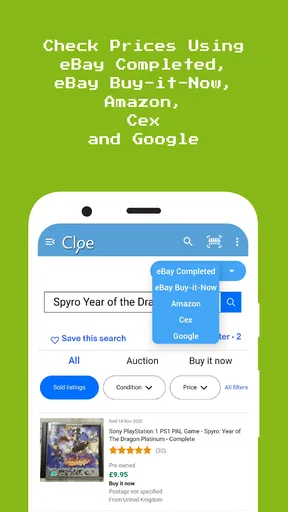
 Analysis by AppCompare
I use eBay for more than browsing, and I know how much guesswork can creep into deciding what an item might sell for. That is the problem Cloe Completed Listing on eBay is meant to help with: it focuses on completed sales and current Buy It Now listings, with barcode scanning and text search as ways to look up an item. I find that narrow purpose useful, especially when I want a quick market check rather than a full inventory or bookkeeping system.
Checking the market before listing
The app is a free shopping tool from Epic Appz, with optional in-app purchases priced from $0.99 to $12.99 per item. It has a 3.8 average from 123 ratings, and 10K+ installs. Those figures suggest that it has found an audience, but I would treat it as a focused helper rather than a proven all-in-one selling platform. Its current version is 97, it was released on August 22, 2018, and it is rated for Everyone; Android users need version 5.0 or later.
The distinction between completed listings and active Buy It Now listings matters. Active prices show what sellers are asking, not necessarily what buyers have paid. Completed results give a more grounded reference when I am weighing whether an item is worth listing, while current listings help me see what a buyer would be comparing it against. Neither view guarantees that my item will sell for a particular amount, but using both is more informative than copying the highest asking price I can find.
For a practical check, I would search for the exact model, edition, or identifying detail rather than rely on a broad item name. A search for “camera,” for example, could mix very different products; adding a model name or a distinctive feature makes the comparison more useful. If the item has a barcode, scanning can save typing, but I would still review the returned matches before drawing a conclusion. Similar packaging does not always mean the same condition, bundle, or version.
Readability and navigation
The app’s purpose is easy to grasp: look up an item and use eBay market results to inform a selling decision. That direct focus is a plus for anyone who does not want to navigate a general shopping app before getting to the research. Search is also a sensible alternative when an item has no barcode, or when the code identifies a broad product family rather than the exact item I have.
When reading results, I would compare like with like. A used item should not be judged against a new one without accounting for condition, and a listing that includes accessories should not be treated as equivalent to a bare item. For collectibles, model-specific details and completeness can matter just as much. The app can help surface comparable eBay activity, but the seller still needs to judge whether each result is genuinely comparable.
This is also why I would use it as a research step rather than expect it to make the whole listing decision for me. Before pricing, I would note a small group of close matches, check whether they are completed sales or current offers, and look for meaningful differences in condition and included parts. That simple routine helps prevent one unusually high or low result from dominating my estimate.
Worth Reading Before You Choose

EA SPORTS FC Mobile 26 Is a Bigger Football Game, but It Takes Time

Flipboard Shows What News Apps Must Do Beyond the Feed

Switching to Android Auto Means Rethinking Your Driving Routine

Google Calendar Makes a Crowded Week Easier to Manage

Ludo King Makes the Most of the Minutes Between Plans

Baby Panda World Brings Quick Play to Modern Phones, but Its Game Library Feels Busy
Motor and sensory considerations
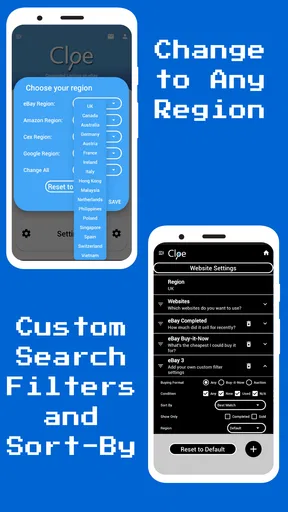
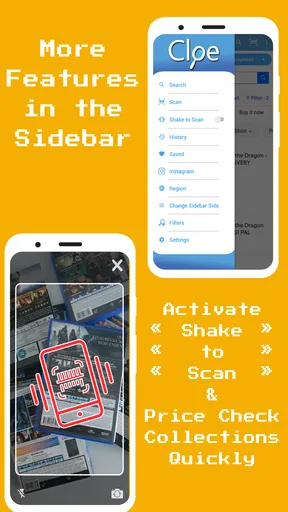
Barcode scanning can be convenient when I am handling an item in person, while text search gives me another route when scanning is awkward or unhelpful. In a busy shop, a quick scan may be easier than typing a long product name; at home, search can be more controlled if I want to enter a model number carefully. Having both approaches is useful, but neither removes the need to check that the result actually matches the item.
For people who find sustained screen interaction tiring, the app’s specific lookup role may suit short sessions better than a broad seller-management tool. A person can research a handful of items, make notes, and leave the rest of the listing work for later. I would not assume that every step is equally comfortable for every user, though: camera-based scanning depends on being able to position the item and phone, while typed search depends on being able to enter distinguishing terms accurately.
A good workaround is to prepare identifying details before opening the app. I might write down the brand and model, or check a label on the item, then use those details in search if scanning is inconvenient. If I am helping someone else sell an item, I can also ask them to point out the exact version and condition before comparing results. That reduces repeated searching and makes the task less frustrating.
Getting Started with Cloe Completed Listing
First things first, downloading the app was a breeze. It’s available on both Android and iOS, which is super convenient. Once I had it installed, the app greeted me with a clean and straightforward interface. You know me, I’m all about user-friendly designs, and Cloe Completed Listing didn’t disappoint.
Setting it up was as simple as logging into my eBay account through the app. One thing I noticed immediately was how smooth the integration was. It synced my account details without a hitch, pulling in past sales data for analysis. This is where the magic begins.
Features That Stand Out
Cloe is packed with features designed to help you maximize your sales potential on eBay. One of the standout features is its ability to analyze completed listings. It’s like having a mini analytics guru in your pocket. The app sifts through tons of data to show you what’s selling and for how much. Trust me, this saves a ton of time compared to manually scouring listings.
Another cool feature is the pricing recommendations. Based on the analytics, the app suggests competitive pricing for your items. I gave it a try, and it was spot on! It’s a great way to ensure you’re not underselling or overpricing your stuff.
Boosting Sales with Insights
The insights don’t stop at pricing. Cloe offers advice on the best times to list items. I was a bit skeptical at first, but when I tried listing an item during the recommended time, I saw an uptick in views and even snagged a sale! It’s little things like this that make the app invaluable, especially if you’re serious about increasing your sales.
The app also provides suggestions on how to improve your listings. From tweaking titles to optimizing descriptions, Cloe has got your back. I followed some of its advice, and I swear, my listings looked way more appealing. It’s like having a personal eBay coach.
Situational access and everyday use
A realistic use for me would be sorting through a box of household items before deciding what is worth selling. I could scan the barcode on a packaged appliance, then switch to a more specific search if the results include several versions. For an unboxed item, a model number or distinctive product name is a better starting point. I would check completed results first, then glance at current Buy It Now offers to understand the competition, and only then decide whether preparing a listing is worthwhile.
This workflow is particularly helpful when I am deciding between donating an item, keeping it, or putting time into selling it. If the comparable results are sparse or vary widely, I would avoid treating a single result as a reliable price signal. I would either refine the search or accept that the app’s results are only a rough guide for that item. That is a more sensible use of market research than expecting every product to have a neat, obvious value.
Compared with searching eBay directly, Cloe’s appeal is its emphasis on completed listings and lowest Buy It Now comparisons in a purpose-built lookup. The regular eBay app is the more natural choice when I want to browse, communicate, manage purchases, or handle the broader selling process. A spreadsheet can be better for tracking a large collection of research notes over time, but it takes more manual work. I see Cloe as a quick research companion, not a replacement for those alternatives.
Remaining barriers and trade-offs
One important distinction is between using a tool to research prices and using one to complete a sale. A market lookup can inform a decision, but it does not by itself settle how I will photograph an item, describe wear, choose shipping, or respond to a buyer. Sellers who want one place to manage every part of their business may find a dedicated seller workflow or eBay’s own tools more suitable. Cloe makes the most sense when the question is specifically, “What are similar items doing on eBay?”
Search quality depends on the detail I provide and on how closely the results match my item. A broad phrase can produce noisy comparisons, and a barcode can identify a product without capturing its condition or the contents of a particular bundle. I would not make an important pricing decision from one scan alone. Checking a few relevant results and using judgment is a small extra step, but it is essential for avoiding misleading comparisons.
The optional purchases are another practical consideration. The app is free to start with, but in-app items range from $0.99 to $12.99 each. I would first work out whether the basic lookup fits my routine before paying for anything, and make sure I understand the value of a particular purchase for my own use. Someone who only checks an occasional item may not need to spend; a frequent seller should weigh any extra cost against the time saved.
The age rating is Everyone, which makes the stated content rating broad, but that alone does not tell me whether the interaction style will suit a particular person. Anyone who relies on specific accessibility settings or needs a particular display or input behavior should try the relevant tasks on their own device before depending on the app for regular work. If scanning is difficult, text search offers a practical alternative; if typing is difficult, preparing a label or asking someone to help identify the item may be the easier route.
User Experience and Interface
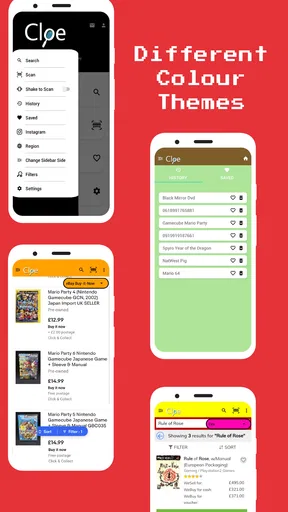
Let’s talk about the nitty-gritty—how it feels to use the app daily. The interface is sleek and intuitive, which I appreciate. Navigating through the app feels natural, and I didn’t encounter any lag or crashes. The developers clearly put some thought into making it as seamless as possible.
One minor hiccup was the learning curve. While it’s straightforward, getting the hang of all the features took a bit of time. But once you’re past that, it’s smooth sailing. The app also has a handy help section if you ever get stuck, which I found reassuring.
That learning time is worth factoring in if I only need to check one item. A first-time user may need a little practice to understand which results answer which question: completed activity is a guide to past outcomes, while active offers show competing asking prices. Once that difference is clear, the research is easier to interpret. If I am already comfortable searching eBay and only need to list one familiar product, going straight to the usual eBay tools may be quicker.
Who will get the most from it
I would recommend Cloe to casual resellers who regularly come across unfamiliar items and want a faster way to judge whether eBay is a sensible place to sell them. It can also help a seller compare a used item against market activity before settling on a starting price. The strongest use case is repeated, focused research—not expecting an app to guarantee a sale or tell me exactly what every individual item is worth.
I would skip it if I mainly need a full business dashboard, a dependable record of every expense, or a single workspace for handling listings and orders. It is also a weaker fit if the items I sell are unusual enough that relevant comparisons are hard to find, or if I am not comfortable checking whether results match in condition and details. In those situations, direct research on eBay or a more comprehensive selling setup may serve me better.
Final Thoughts
All in all, Cloe Completed Listing on eBay is a game-changer for eBay sellers. Whether you’re a newbie or a seasoned seller, the app offers valuable insights that can boost your sales and streamline your selling process. It’s like having an expert guide you through the maze of online selling.
If you’re ready to up your eBay game, I’d say give Cloe a shot. You might just find that it’s exactly what you needed to take your sales to the next level. Happy selling!
My more measured take is that it is most useful when I treat it as a shortcut to research, not as an authority on price or a complete selling assistant. I would use it to narrow down comparable eBay activity, then make the final call based on the item’s condition, completeness, and the effort involved in listing it. For people who want that specific kind of check, the focused approach is worthwhile; for anyone seeking broader seller management or hands-off pricing decisions, another option will be a better fit.
Pros
- User-friendly interface for easy navigation.
- Real-time updates on listing status.
- Integrated analytics for performance insights.
- Secure payment processing through the app.
- Customizable listing templates available.
Cons
- Limited to eBay platform only.
- Occasional sync issues with listings.
- Ad-supported free version.
- Requires stable internet connection.
- Limited customization for notifications.
FAQs for Cloe Completed Listing on eBay
What is Cloe Completed Listing on eBay?
Cloe Completed Listing on eBay is an app designed to help users track and analyze completed listings on eBay. It provides insights into pricing trends, sales history, and market value, enabling users to make informed buying or selling decisions. This tool is particularly useful for collectors, resellers, and frequent eBay users.
How does Cloe Completed Listing on eBay benefit sellers?
For sellers, Cloe offers valuable insights into the competitive landscape on eBay. By analyzing completed listings, sellers can determine optimal pricing strategies, understand market demand, and identify popular items. This can lead to more successful sales and increased profits by aligning with current market trends.
Is Cloe Completed Listing on eBay easy to use for beginners?
Yes, Cloe is designed with a user-friendly interface that caters to both beginners and experienced users. It provides intuitive navigation and clear data visualization, making it easy for anyone to access and interpret the information. Tutorials and customer support are also available to assist new users in getting started.
Does Cloe Completed Listing on eBay require a subscription?
Cloe offers both free and premium subscription options. The free version provides basic functionality, while the premium version unlocks advanced features such as detailed analytics, historical data, and personalized alerts. Users can choose the plan that best fits their needs and budget.
Can I access Cloe Completed Listing on eBay from multiple devices?
Yes, Cloe is available on both Android and iOS, allowing users to access their account from multiple devices. This ensures flexibility and convenience, enabling users to stay updated on eBay listings whether they're at home or on the go. Data is synced in real-time to provide a seamless experience.


